# Claude Managed Agents now run in your own sandbox and connect to private networks
Canonical URL: https://zero2vibecode.com/blog/claude-managed-agents-sandbox-mcp
Date: 2026-08-10
Tags: agents, claude-code, security, beginner
Self-hosted sandboxes and MCP tunnels let Claude agents work securely with your private data and services—here's what changes for builders.
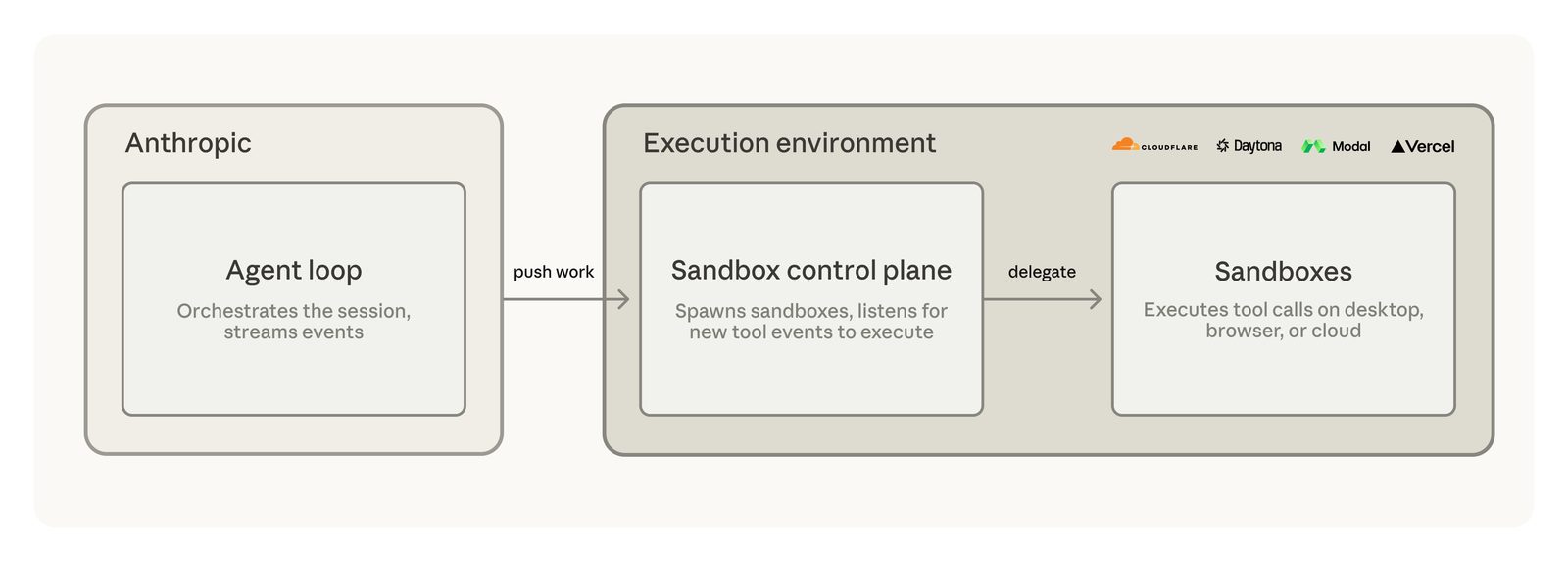
When you build with Claude Managed Agents, you now control where the work happens and what it can access. Two new capabilities—self-hosted sandboxes and MCP tunnels—shift execution to your infrastructure while keeping the agent's reasoning on Anthropic's servers.
## Why this matters for your projects
Managed Agents previously ran entirely on Anthropic's infrastructure. Now:
- **Self-hosted sandboxes** move tool execution (like running code or processing files) to servers you control
- **MCP tunnels** let agents securely query internal databases and APIs without exposing them to the internet
This matters most when:
- Your tools work with sensitive data (customer records, financials, proprietary code)
- You need to comply with internal security policies
- Existing agents hit compute limits in the default environment
## How self-hosted sandboxes work
The agent's "brain" (orchestration, error handling, context tracking) still lives on Claude servers. But when it needs to:
- Run a Python script
- Process a spreadsheet
- Generate an image
That work happens in your sandbox. You choose where that runs:
| Option | Best for | Example Providers |
|--------|----------|------------------|
| Your own servers | Full control over hardware | Bare metal, VMs |
| Managed sandbox | Fast setup, scaling | Cloudflare, Daytona |
Start with a managed provider if you're new to infrastructure. Their pre-configured environments handle security isolation and scaling so you can focus on agent behavior.
## Four sandbox providers compared
The announcement highlights four partners with different strengths:
| Provider | Key Feature | Use Case |
|----------|------------|----------|
| Cloudflare | Lightweight isolation, network controls | Design tools processing brand assets |
| Daytona | Persistent, stateful environments | Long-running build/test agents |
| Modal | AI-optimized containers | Data pipelines, GPU workloads |
| Vercel | Fast startup, VPC integration | Frontend preview generators |
## Connecting to private services with MCP tunnels
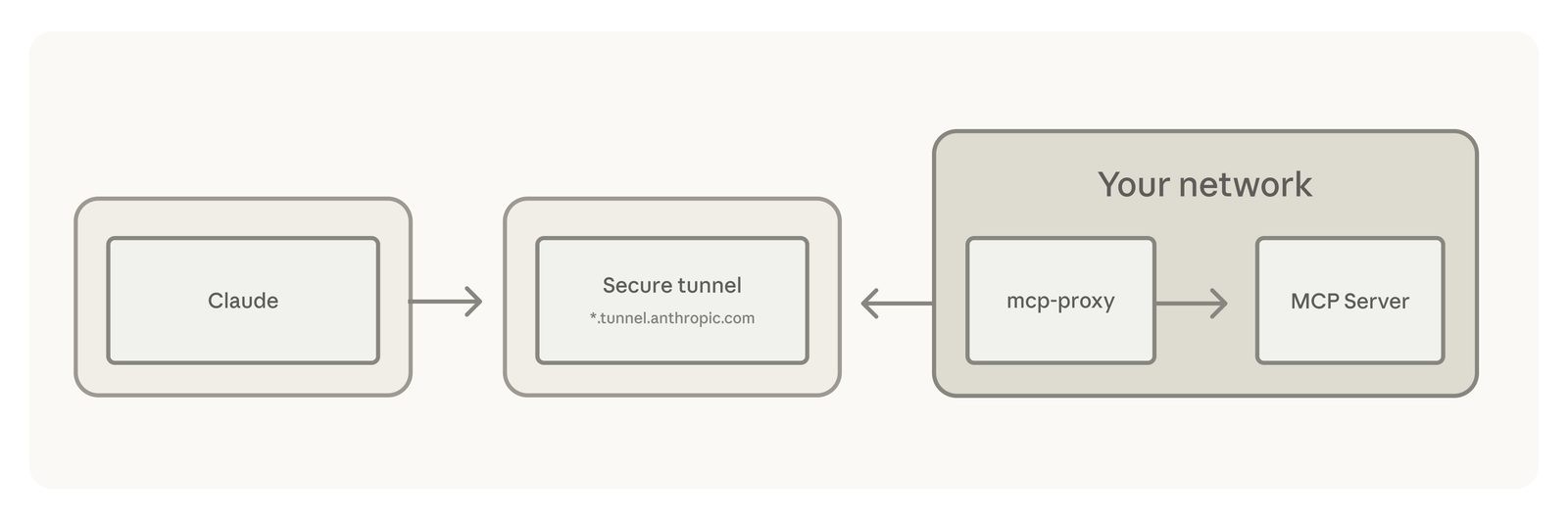
Model Context Protocol (MCP) tunnels solve a different problem: letting agents access internal resources like:
- Customer databases
- Inventory systems
- HR platforms
Without these tunnels, you'd need to:
1. Expose the service to the internet (security risk)
2. Build and maintain custom API gateways (engineering overhead)
Now a lightweight tunnel component makes one outbound connection from your network. Agents access services as if they were local.
## What this means for beginners
If you're just starting with AI agents:
- Stick with the default sandbox for early experiments
- Consider MCP tunnels only when your agent needs internal data
- Explore managed providers before self-hosting
These features target production deployments. While available in beta/preview, expect configuration complexity beyond basic agent building.
## Real-world use cases
The announcement cites teams already using these capabilities:
1. **Amplitude's Design Agent**
- Generates branded marketing assets
- Uses Cloudflare to keep design files secure
2. **Clay's GTM Agent**
- Automates sales workflow testing
- Runs on Daytona for persistent environments
3. **Rogo's Finance Agent**
- Analyzes proprietary investment data
- Connects via MCP tunnels to internal systems
## Getting started
- **Sandboxes**: Public beta, available now in Claude Console
- **MCP Tunnels**: Research preview (request access)
For your first sandbox:
1. Pick a provider from the supported list
2. Follow their setup guide
3. Configure the agent to use it
## Frequently asked questions
No. Default Managed Agents work fine for prototypes and public data. These options matter when you need tighter control over where code runs or what data it touches.
Yes. Agents reference sandboxes by configuration, so you can change providers without rewriting tool logic.
These updates make Managed Agents viable for more serious applications while keeping the beginner-friendly workflow intact. The hardest part remains designing what your agent should do—now you have more choices for how it gets done.
Want to try all of this hands-on? Start with the free [Claude Code from Zero](/learn/claude-code) course.
Based on Anthropic's announcement, "New in Claude Managed Agents: self-hosted sandboxes and MCP tunnels". Written for people learning to build with these tools.