When you build an iOS app with AI today, you face a choice: use Apple’s fast but limited on-device models, or call a cloud API like Claude for complex tasks but deal with network delays. Claude’s new integration with Apple’s Foundation Models framework removes that compromise.

How Apple's framework worked before
Apple’s Foundation Models framework lets Swift developers add AI features with minimal code. For example, you could:
- Summarize text in 3 lines of Swift
- Extract dates/names from documents
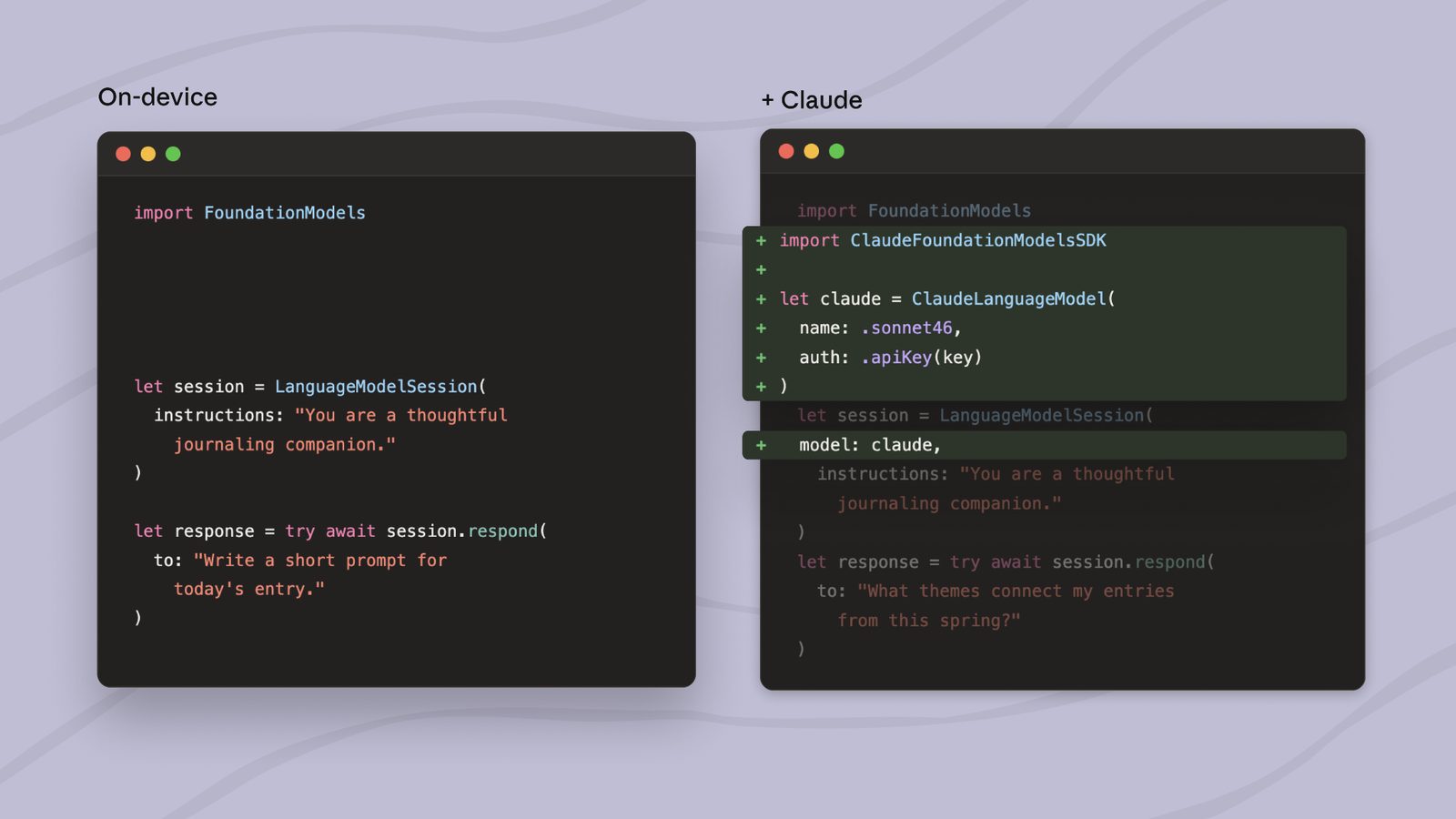
- Generate simple prompts for journaling apps
These tasks run entirely on the device—fast and private, but limited to what small local models can handle. When users asked follow-up questions or needed code generation, you had to build a separate cloud API call, manage different response formats, and stitch the results together.
What changes with Claude integration
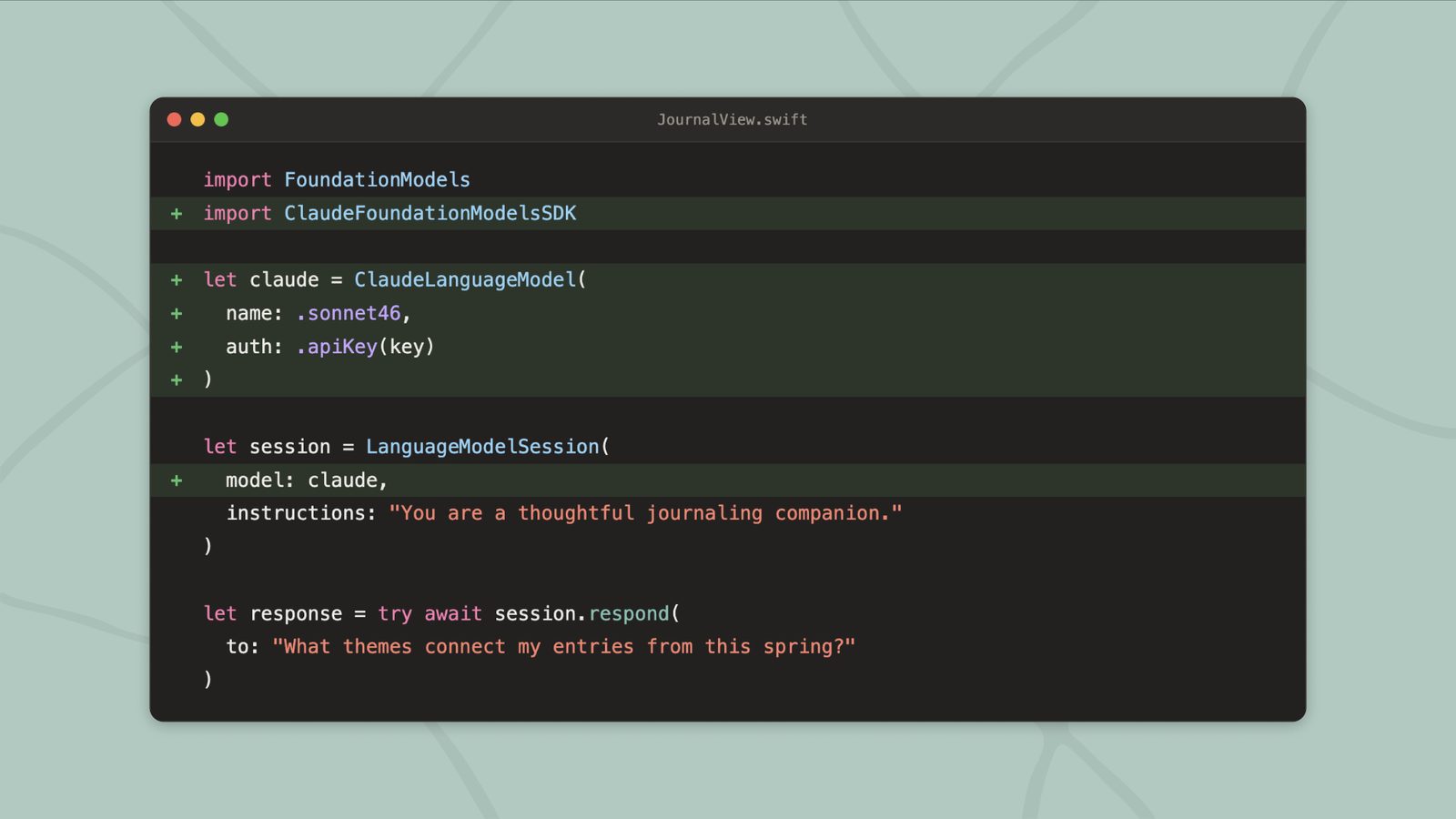
Now you can hand off complex tasks to Claude without leaving Apple’s framework. The key improvements:
- Single workflow - Start with on-device processing, seamlessly shift to Claude when needed
- Structured data - Claude receives clean Swift objects instead of raw text
- Combined results - Claude’s output streams back into your existing SwiftUI views
Tip
This matters most when your app needs both quick local responses and deeper analysis. A study app might define terms locally, then call Claude when the student asks “How does this connect to last week’s lesson?”
When to use this vs. direct Claude API
| Scenario | Use |
|---|---|
| Simple text processing (summaries, extraction) | Apple’s on-device models |
| Multi-step reasoning, code generation | Foundation Models → Claude |
| Web search, data analysis | Direct Claude API |
| Fully offline operation | On-device only |
What you can build now
- Learning apps that explain concepts simply on-device, then expand with Claude when students ask “why does this matter?”
- Journaling apps where daily prompts generate locally, but monthly reflection themes come from Claude analyzing your entries
- Document tools that extract clauses on-device, then have Claude compare them to regulatory guidelines
Getting started
You’ll need:
- Xcode 27+
- iOS 17+/macOS 27+ device
- Anthropic API key
Add the Claude Swift package, then use @Generable annotations to pass typed Swift values to Claude. The package handles:
- Authentication
- Streaming responses
- Tool use (web search, code execution)
- Structured data return
Important
Unlike web-based Claude tools, this requires actual Swift development. If you’re new to mobile dev, start with vibe coding in the browser first.
Limitations to know
- Only available on Apple platforms (no Android/Windows)
- Requires latest OS versions
- Still needs internet for Claude portions
- More setup than pure web tools
Why this matters for learners
This integration shows how AI development is evolving:
- Specialization - Different models handle what they’re best at
- Composition - Services combine like LEGO blocks
- Abstraction - Complex chains become simple API calls
You’re seeing the future—not one monolithic AI, but many specialized components working together. The skill becomes knowing when to use which tool.
Want to try all of this hands-on? Start with the free Claude Code from Zero course.
Source
Based on Anthropic’s announcement, “Building intelligent apps for Apple platforms with Claude in the Foundation Models framework”. Written for people learning to build with these tools.