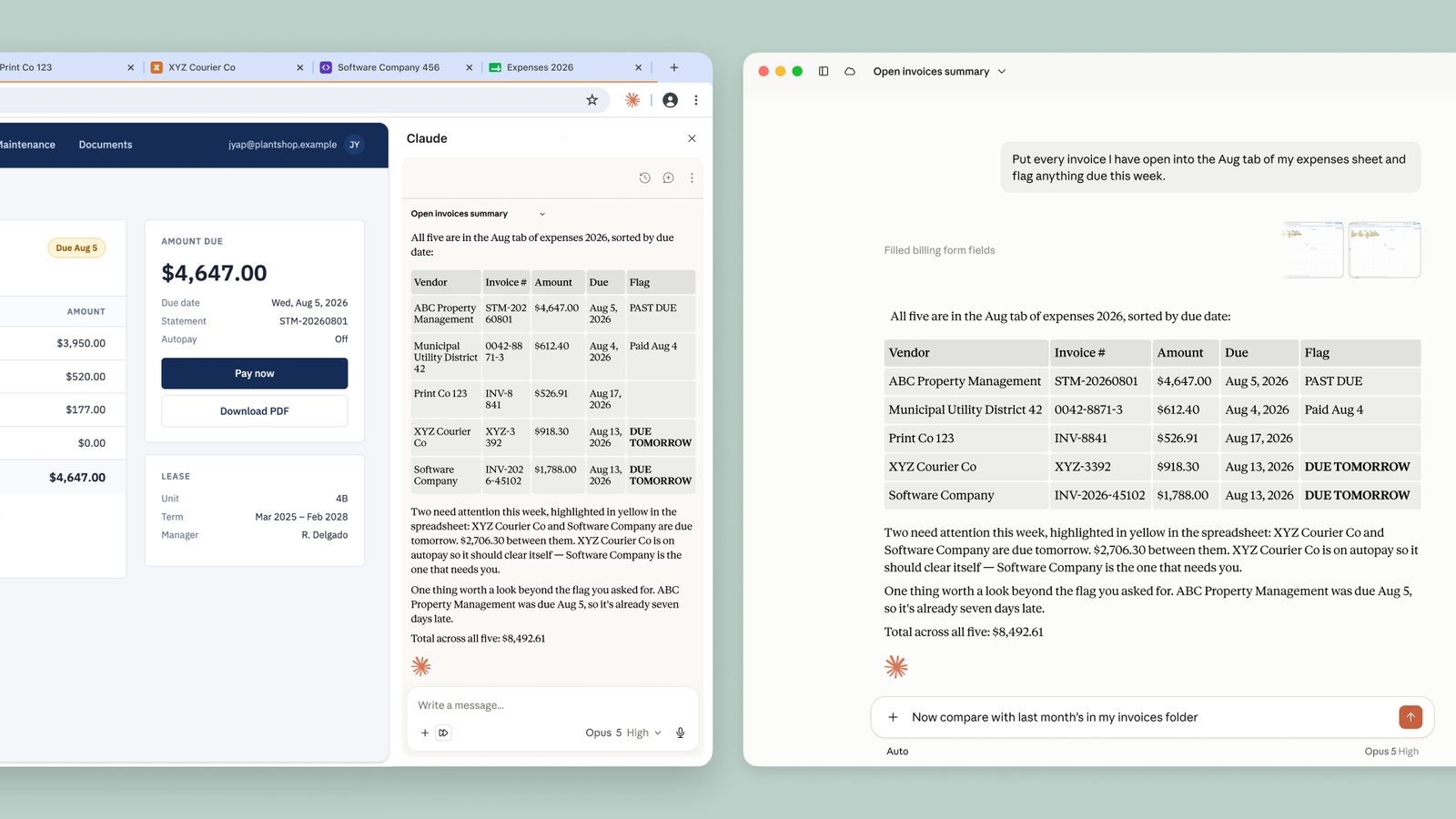
Claude’s Chrome extension now lets the AI take actions in your browser without asking for approval each time. This changes how you work with tools that don’t have official Claude integrations—internal dashboards, old systems, vendor portals—by letting Claude navigate, fill forms, and click links using your logins.

What changed in Claude for Chrome
Previously, every action Claude took in your browser—opening a link, typing into a field—required your explicit approval. Now:
- Claude can proceed automatically when it’s confident the action matches your request
- A safety classifier double-checks each action before it runs
- You can revert to manual approval in settings if preferred
This works across all paid Claude plans. The desktop app remains necessary for working with files or other applications.
How Claude handles hidden attacks
When an AI acts in your browser, malicious sites can hide instructions in pages or forms to trick it. Claude now defends against these “prompt injection” attacks with three layers:
- Attack recognition training - Claude learns from a growing library of real and simulated attacks
- Content scanning - Probes check web content before Claude sees it, flagging suspicious material
- Action verification - A classifier confirms each action matches your original request
Note
These protections evolved through months of testing with professional security researchers before today’s release.
What the safety tests show
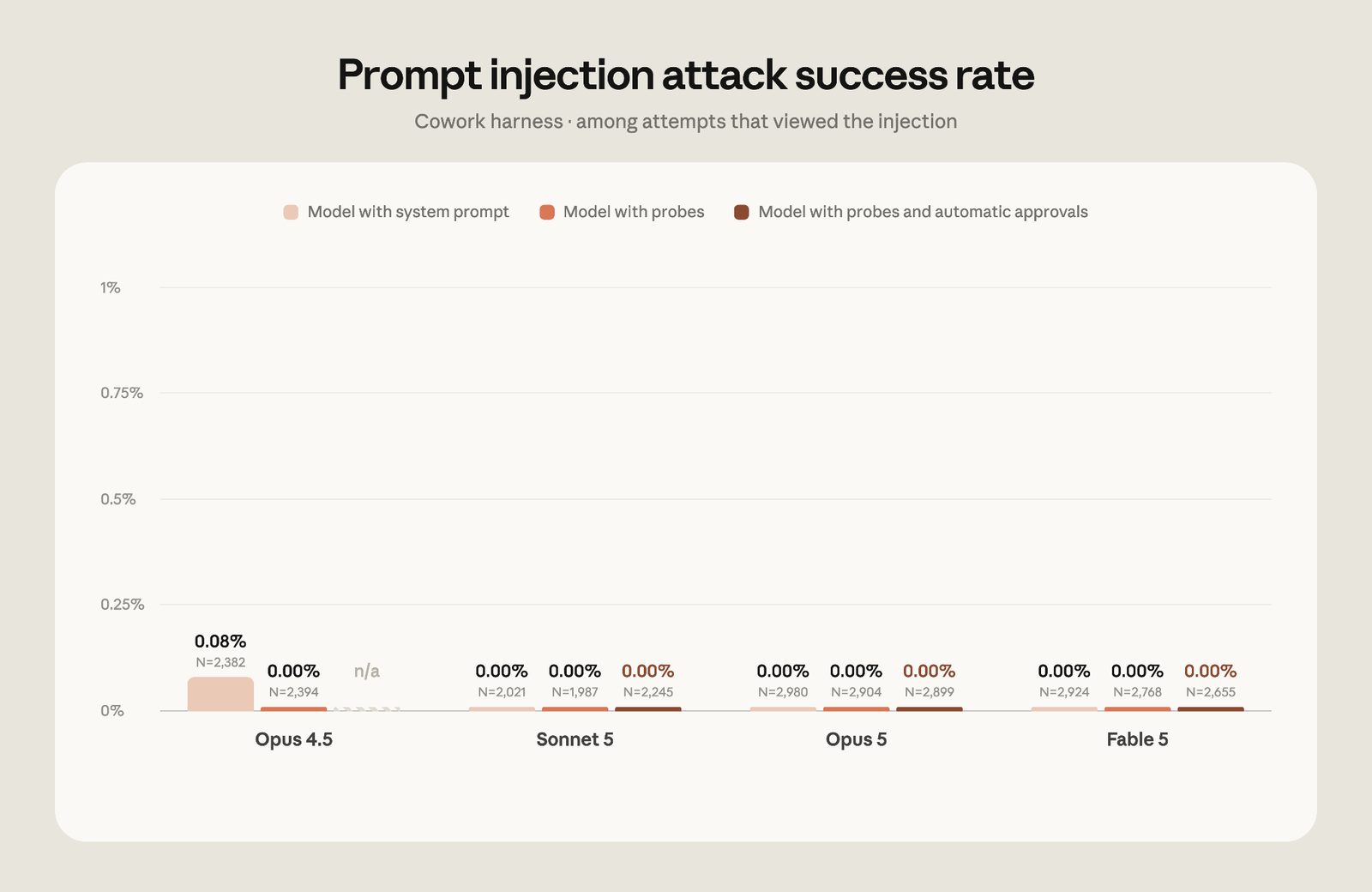
Anthropic’s latest evaluations against professional red-team attacks show:
| Model Version | Attack Success Rate |
|---|---|
| Opus 4.5 | 17.6% |
| Opus 5 | 3.8% |
| Sonnet 5 | 0% |
| Fable 5 | 0.3% |
With all safeguards enabled, no attacks succeeded against Sonnet 5 or Opus 5. The few that got through against Fable 5 were low-risk scenarios the team is addressing.
When to use automatic actions
This feature shines when:
- Working across multiple internal tools that lack APIs
- Processing high volumes of routine forms or data entry
- Researching across many sites where manual approval would slow you down
For sensitive actions—financial transactions, personal data—consider keeping manual approval on.
How to get started
- Install the Claude Chrome extension
- The first time Claude wants to act, it will explain the auto-approval system
- Try it with simple tasks like:
- “Summarize this support ticket”
- “Find the pricing page on this vendor site”
- “Extract the due dates from this project board”
Enterprise admins can restrict which domains Claude accesses through organization settings.
What this means for builders
For beginners creating tools with Claude:
- You can now prototype workflows that span multiple web tools
- No need to build custom integrations for every legacy system
- Test with manual approval first, then enable auto-actions for stable processes
Important
Always review Claude’s actions when working with sensitive data or systems, even with auto-approval on.
The same safety principles apply whether you’re building for personal use or at scale. Claude’s defenses aim to catch attacks before they reach your workflows.
Frequently asked questions
Can Claude log into my accounts?
Yes, but only through your existing browser sessions. It doesn’t store or manage credentials separately.
What browsers support this?
Only Chrome for now. Mobile and other Chromium browsers aren’t supported yet.
How do I know if a site is trying to attack Claude?
The system doesn’t show you most blocked attempts—they’re handled before you’d notice. For detected high-risk attempts, Claude will alert you.
This update makes Claude more useful for daily browser work while maintaining security. The balance of automation and safeguards reflects Anthropic’s approach to deploying AI assistants that work alongside you safely.
Want to try all of this hands-on? Start with the free Claude Code from Zero course.
Source
Based on Anthropic’s announcement, “Claude in Chrome is generally available”. Written for people learning to build with these tools.